Something changed on your site.
Logify already knows who.
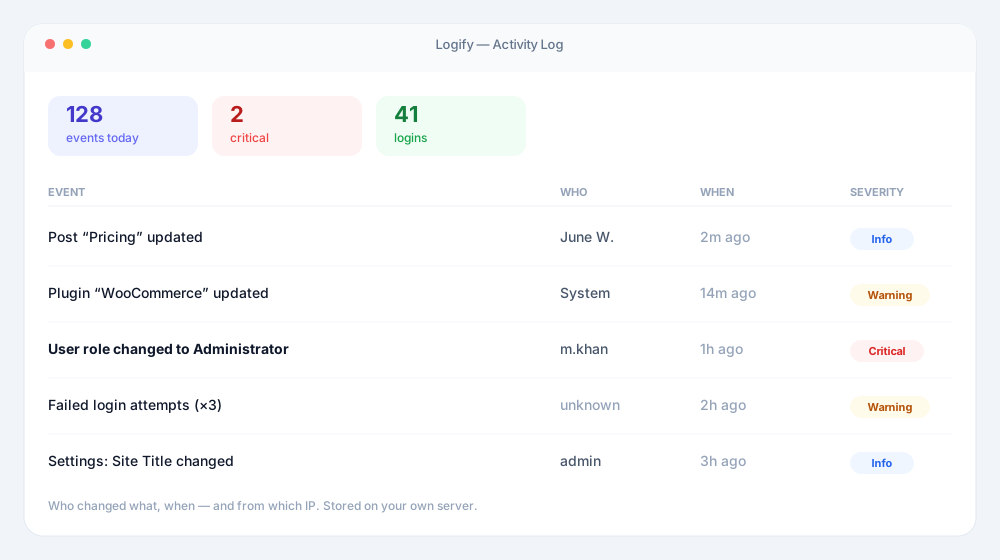
A complete, searchable audit trail of every action on your WordPress site — logins, content, plugins, themes, settings, and the plugins that run your business. Know what happened, who did it, and when, before your visitors ever notice.
30-day no-risk guarantee • Instant access • Logs stay on your own server
- 94
- Event types tracked
- 9
- Plugin integrations
- 5 min
- Setup time
- 30 days
- Money-back guarantee
The problem
WordPress remembers nothing
Out of the box, WordPress keeps no record of who did what. When something breaks, the trail is already cold — and the questions that matter have no answer.
“Who deleted that page?”
A published page disappears overnight. Three people had access. Nobody remembers touching it, and there is nothing to check.
“Why did the site break at 2am?”
A plugin auto-updated, a setting changed, a theme file was edited. Without a trail you are guessing, and guessing takes hours.
“Is someone trying to get in?”
Failed logins leave no trace in core WordPress. A password-guessing run against your admin looks exactly like silence.
Logify answers all three — from the moment you activate it, with no configuration.
What is Logify?
Logify is a free WordPress activity log plugin that records who did what on your site — logins, content edits, plugin and theme updates, user changes, and settings — each with a timestamp, severity and IP address. Add exclusion rules to cut the noise, export audit-ready reports, and upgrade to PRO for real-time alerts, deeper analytics, and activity logging inside WooCommerce, Gravity Forms, ACF, bbPress, MemberPress, Yoast SEO and more.
Features
Everything you need to answer “who changed this?”
Logify records the full picture out of the box. PRO adds the alerting, analytics and integrations that turn a log into an early-warning system.
Audit Trail
Every change on your site, on one screen
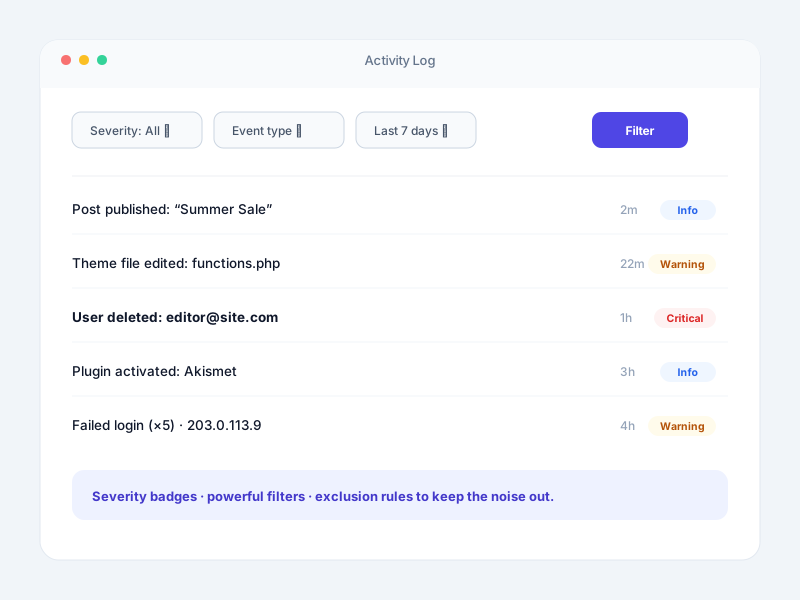
Logify starts recording the moment you activate it. Logins, posts, comments, plugins, themes, media, menus, widgets and core settings all land in one searchable log — each entry stamped with the user, the action, the IP and the exact time.
- Severity at a glance.
- Every entry carries an INFO, WARNING or CRITICAL badge, so the things that matter surface without you reading a single row.
- Filters that actually narrow things down.
- Cut the log by severity, event type, user or date range and find the one change you care about in seconds.
- Exclusion rules keep the noise out.
- Ignore a bot account, a chatty role, a staging IP or a whole event category. What is left is the trail worth reading.
- Brute-force detection built in.
- Failed logins are throttled and grouped per IP, so a password-guessing burst reads as one clear event instead of a thousand rows.
Real-Time Alerts
PROFind out when it happens, not next Tuesday
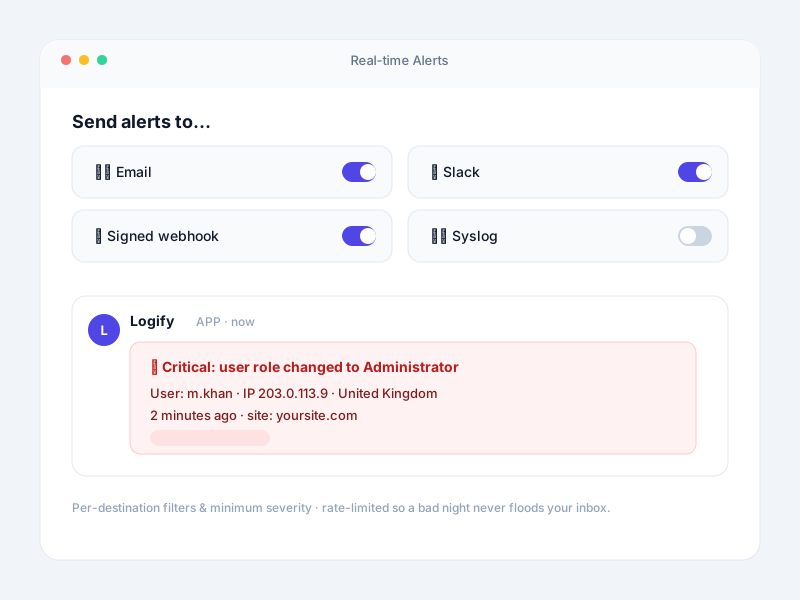
Stop watching a dashboard. Logify PRO pushes the events you choose straight to the tools your team already lives in, the moment they are recorded.
- Four destinations.
- Email, Slack, generic JSON webhooks and Syslog over UDP. Configure one or run all four side by side.
- Signed webhooks.
- JSON webhooks can be HMAC-signed, so the receiving service can verify the payload really came from your site.
- Per-destination filters.
- Send critical security events to Slack and everything else to email. Each destination gets its own event types, minimum severity and rate limit.
- Rate limiting that respects your inbox.
- A noisy incident cannot flood you. Alerts are capped per destination so a real emergency stays readable.
Analytics & Timeline
PRORead the pattern without reading the log
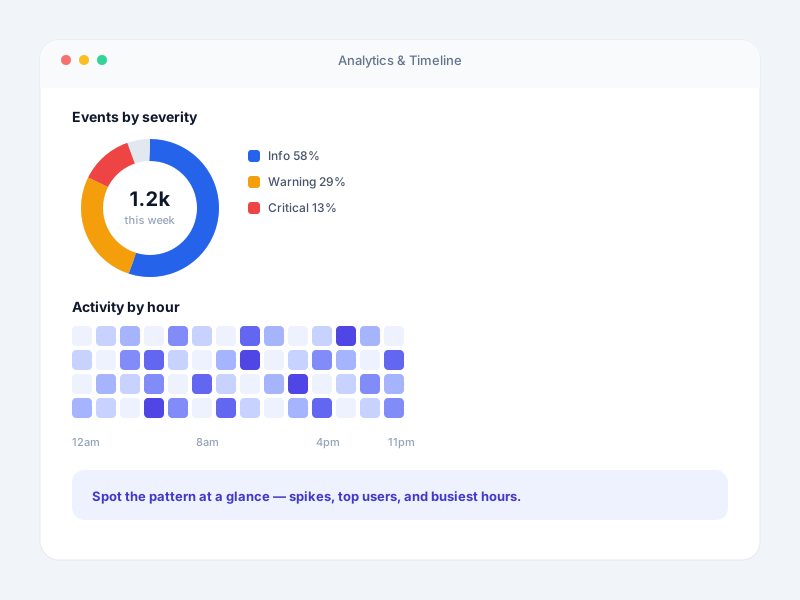
The PRO dashboard turns thousands of entries into a picture you can act on, and the Activity Timeline replays any single user as a clean chronological story.
- Severity distribution & security trend.
- See at a glance whether this week looks like every other week — or whether something changed.
- Activity heatmap.
- Weekday against GMT hour. A cluster of admin activity at 3am is obvious in a way a list never makes it.
- Top IP addresses & object types.
- Know where activity is coming from and what it is touching, without building a single report by hand.
- Activity Timeline per user.
- Open any user from the Users screen and replay exactly what they did, filtered by date, with load-more paging.
Sessions & Email
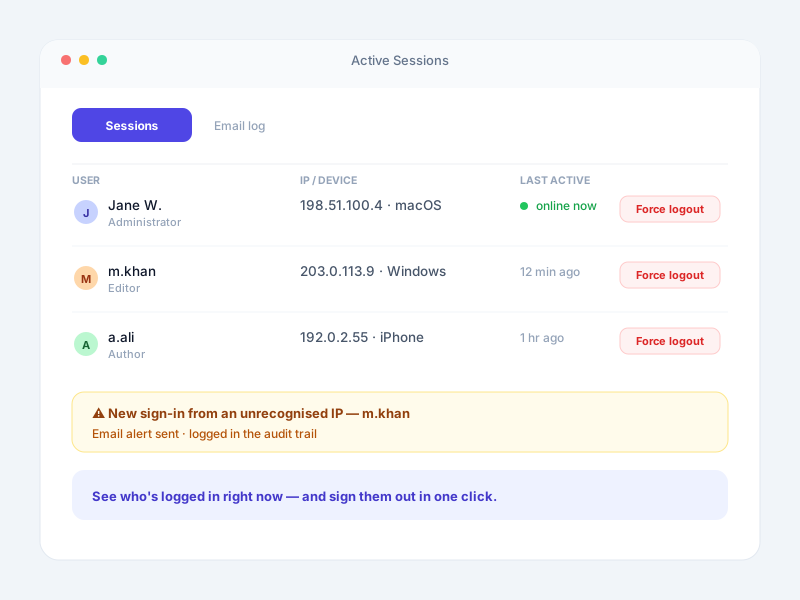
PROSee who is logged in — and sign them out
A live ledger of every session on your site, and a full record of every email WordPress sent. Two blind spots most activity logs leave wide open.
- Live session ledger.
- Active, idle, expired and revoked sessions per user, with login time, last activity, duration, browser, device, IP and country.
- Force Logout in one click.
- End any session from the dashboard. It is terminated inside WordPress itself, so the next request from that browser is signed out.
- Complete email log.
- Recipient, CC, BCC, Reply-To, subject, body, attachments, IP and delivery status — including the error message when a send fails.
- Login method tagging.
- Magic Link and Temporary Login sign-ins are badged in the log, so passwordless and guest access never blend into normal traffic.
Reporting & Control
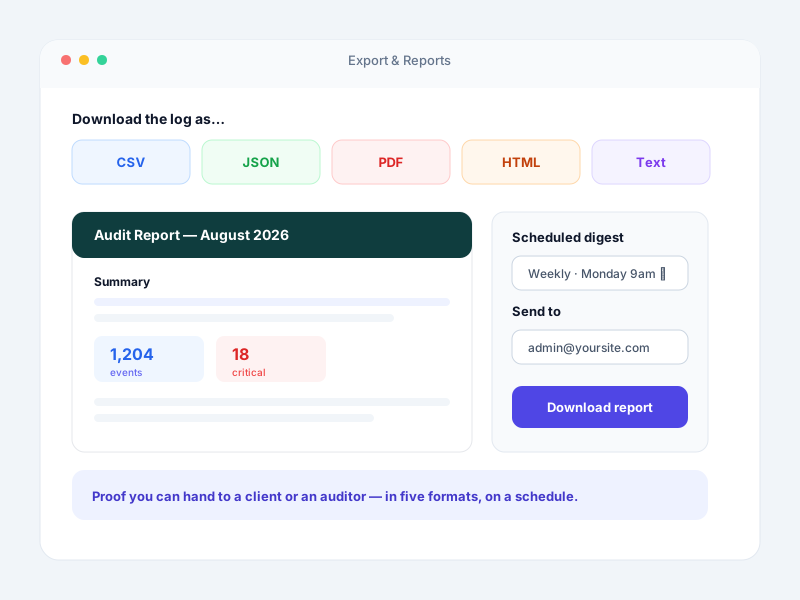
Proof you can hand to a client or an auditor
Export the trail in whatever shape the person asking needs it, keep it exactly as long as your policy says, and drive the whole thing from the command line when you manage sites at scale.
- Five export formats.
- CSV, JSON, HTML, plain text and an audit-ready PDF — filtered to exactly the slice you need before you export.
- Scheduled email digests.
- Daily, weekly or monthly summaries land in your inbox. PRO adds severity breakdowns, brute-force bursts, top user, top IP and top event type.
- Retention on your terms.
- Keep logs for 7 days, 30 days or indefinitely, with anonymisation options for privacy-sensitive setups.
- WP-CLI for bulk work.
- Prune, purge and manage logs across every site you run from a script instead of a browser tab.
Integrations
Your plugins keep changing things too
A generic activity log stops at core WordPress. Logify follows the change into the plugins that actually run your business — your store, your forms, your memberships, your forums — and records it in the same trail, with the same filters and the same exports.
WooCommerce
Products, orders, order items and refunds, coupons, customers, product categories, product tags and store settings — each change attributed to the person who made it.
Answer a price dispute or trace a refund without opening the database.
Read the guideGravity Forms
The full form lifecycle: created, saved, duplicated, imported, activated, deactivated, trashed and deleted — with the user and timestamp on every entry.
When leads stop arriving on a Tuesday, find the deactivation from Tuesday.
Read the guideAdvanced Custom Fields
Deletion tracking for ACF field groups, fields, post fields and taxonomy fields — the changes most likely to quietly break a template.
When a custom section vanishes from the front end, you know who removed the field.
Read the guidebbPress
Forum and topic activity — created, edited, closed, marked as spam, removed, restored, and forum status changes across every moderator.
Settle "who closed this thread?" in a community with several moderators.
Read the guideMemberPress
Membership and group changes recorded as they happen — created, updated, deleted and restored, with the administrator behind each one.
Explain why a membership tier changed without asking the whole team.
Read the guideYoast SEO
Changes made through the Yoast SEO panel on a post or page, showing what SEO information changed, on which content, and who changed it.
Catch the meta description edit that moved a ranking page.
Read the guideURL Shortify
Short links created, updated and deleted, logged with the slug, the link type and a plain-English description of what changed.
Trace a broken campaign link back to the exact edit and the exact editor.
Read the guideMagic Link
Passwordless sign-ins are badged MAGIC LINK directly in the activity log, so one-time-link logins never blend into ordinary password logins.
Tell passwordless access apart from a normal login at a glance.
Read the guideTemporary Login
Access through a Temporary Login Without Password link is tagged TEMPORARY LOGIN, so contractor and support sessions are obvious in the trail.
Review everything a support agent did during their temporary session.
Read the guideAnd all of core WordPress, free
Integrations sit on top of complete core coverage. Every one of these is tracked from the moment you activate Logify — no configuration, no paid tier required.
See every event Logify records- Users & roles
- Failed logins & brute force
- Posts & pages
- Comments
- Plugins
- Themes
- Media
- Taxonomy terms
- Navigation menus
- Widgets
- WordPress settings
- Plugin & theme file edits
Alerts go where your team already works
Available in PRO, with per-destination event filters, minimum severity and rate limiting.
Logify by the numbers
Built and supported by the team behind URL Shortify and Magic Link.
- Event Types Tracked
- 94
- Plugin Integrations
- 9
- Support Response
- < 24 Hours
Who it’s for
Built for the people who get the call when something breaks
Agencies & freelancers
Show a client exactly what changed on their site this month, and prove it was not you. One Scale licence covers 25 sites, and exports drop straight into a client report.
- Audit-ready PDF exports per client
- 25-site licence
- Per-user Activity Timeline
WooCommerce store owners
Staff accounts edit prices, refund orders and change coupons every day. Logify records each one — the product, the amount, the person and the moment.
- Order, refund & coupon trail
- Price change history
- Settings drift explained
Membership & community sites
Memberships, forums and forms all change hands between moderators and admins. Keep one shared history instead of a group chat full of guesses.
- MemberPress & bbPress logging
- Gravity Forms lifecycle
- Moderator accountability
Security & compliance teams
Brute-force detection, session control and signed webhooks into your existing tooling. Logs stay on your own server with retention you control.
- Real-time alerts to Slack & Syslog
- Force Logout any session
- Retention & anonymisation controls
Free vs PRO
The free log tells you what happened. PRO tells you while it’s happening.
Everything in Free stays free, forever. PRO adds the three things that turn a record into protection.
Know sooner
Real-time alerts to Email, Slack, signed JSON webhooks and Syslog — filtered per destination by event type and minimum severity, with rate limiting so a bad night never floods your inbox.
See the pattern
Severity donut, weekday-by-hour activity heatmap, top IP addresses, top countries and a security event trend — plus a per-user Activity Timeline that replays exactly what one account did.
Cover your whole stack
WooCommerce, Gravity Forms, ACF, bbPress, MemberPress, Yoast SEO and URL Shortify logging, live session control with Force Logout, and a complete record of every email WordPress sends.
Testimonials
What customers are saying...
Simple and powerful
Simple and powerful, real plug and play thanks a lot !! many useful features

Excellent plugin
Excellent plugin, my personal favorite when it comes to link shorteners. Support is also great!

Does what it says
Fully compatible with PHP 8.0.

Simple & Good work
I would like to have option to control short link length. Thank

easy to use!
all free, ui is very easy to use!

Great support
I had a problem and I got a response very quick with the right tip.

Pricing
Simple pricing: Free, or PRO for every feature
One PRO plan unlocks everything. Just choose how many sites you need — the price does the rest.
Free
Complete activity logging for a single site — free forever.
$0
1 site
- ✓Complete activity log — logins, posts, plugins, themes, users & settings
- ✓Severity badges on every event
- ✓Brute-force login detection with per-IP throttling
- ✓Activity dashboard with 30-day chart
- ✓Filters & exclusion rules
- ✓Export (CSV, JSON, HTML, PDF) & email digest
Everything, unlocked
PRO
Real-time alerts, advanced analytics, and deep integrations.
/ year
Use it on
- ✓Everything in Free
- ✓Real-time alerts to Email, Slack, webhooks & Syslog
- ✓Advanced analytics — heatmap & security trends
- ✓Activity timeline & user sessions ledger
- ✓Force logout & email logs
- ✓WooCommerce, Gravity Forms, ACF & MemberPress logging
- ✓Priority support
Every PRO licence includes updates and priority support, with a 30-day money-back guarantee. If a licence lapses, the free features keep working — nothing is deleted.
Love Logify? Get it — and every plugin we make.
One emerald-tier membership unlocks all six PRO plugins — plus every plugin we release in the future, added automatically.
Buy the six separately
$344 / year
With Elite, from
$199 / year
Save $145 · 42% off
Explore Elite Membership →6 plugins today · every future plugin free · 30-day money-back
Try PRO with nothing at stake
Install the free plugin today and see the trail build itself. Upgrade when you want the alerts — and if PRO is not right for you, tell us within 30 days and we will refund it.
30-day money back
A full refund inside 30 days, no interrogation.
No lock-in
Cancel any time. Your licence stays valid to the end of the term.
Your data, your server
Logs are stored in your own WordPress database. Nothing is sent to us.
Answers under 24 hours
Priority support from the people who build the plugin.
Frequently asked questions
Have a different question and can’t find the answer you’re looking for? Reach out to our support team and we’ll get back to you as soon as we can.
-
Logify is a WordPress activity log plugin that records who did what on your site, including logins, content changes, plugin and theme updates, user changes and setting changes, each with a timestamp.
-
Logify tracks user logins and logouts, post and page edits, plugin and theme activations and updates, user and role changes, and setting changes, so you always know what happened and when.
-
Yes. Every logged event records the user, the action and the time, so you can hold changes accountable across your own site or client sites.
-
Yes. Logify includes exclusion rules so you can ignore specific users, roles or event types and keep only the activity that matters.
-
Yes. You can export activity log reports for security reviews, audits, or client reporting.
-
Logify PRO records activity inside WooCommerce, Gravity Forms, Advanced Custom Fields, bbPress, MemberPress, Yoast SEO and URL Shortify. Logins made through Magic Link or Temporary Login Without Password are tagged in the activity log on every plan. Each integration switches itself on automatically when the plugin is active — there is nothing to configure.
-
Yes. The free plugin covers all of core WordPress — users, posts, comments, plugins, themes, media, terms, menus, widgets and settings. Third-party plugin integrations such as WooCommerce, Gravity Forms, ACF, bbPress, MemberPress, Yoast SEO and URL Shortify are part of Logify PRO.
-
Yes, with PRO. You can send alerts to email, Slack, generic JSON webhooks (which can be HMAC-signed) and Syslog over UDP. Each destination has its own event-type filter, minimum severity and rate limit, so you can route critical security events to Slack and leave everything else for the digest.
-
Yes, with PRO. The User Sessions screen shows every active, idle, expired and revoked session with login time, last activity, duration, browser, device, IP and country — and you can force-logout any session in one click.
-
In your own WordPress database, on your own server. Logify does not send your activity data to us or to any third-party service. Country lookup prefers a local GeoIP database or your CDN header before reaching outside your site.
-
No. You choose a retention period — 7 days, 30 days or keep indefinitely — and Logify prunes older entries for you. You can also bulk-delete, clear all logs, and use exclusion rules so noisy events never get written in the first place.
-
You need a license that covers the total number of sites you have in your network.
-
Absolutely not. Logify is designed and developed with performance in mind. We follow and apply the most modern best practices and standards to ensure things run smoothly and fast.
-
Yes, all of the plugin’s license plans are on a yearly subscription basis. A license renewal is automatically set up upon purchase, which you can cancel whenever you want from your account page. We will also send you reminders a few weeks before the renewal comes due.
-
Absolutely! You can upgrade or downgrade your plan at any time. When you upgrade an existing plan you only pay a prorated amount. When you downgrade, you get an extension of your subscription.
-
No. There are no other fees on any of our plans.
-
Yes. If you ever decide that the plugin isn\’t the best solution for your business, you can cancel your subscription from your account page. When canceling a subscription, renewals are canceled as well. The license key and plugin’s functionality will remain valid until the end of the paid term.
-
We accept all major credit cards including Visa, Mastercard, and American Express, as well as PayPal payments.
-
Yes, we do! We stand behind the quality of our product and will issue a refund if you experience an issue that makes the plugin unusable and we are unable to resolve it.
-
Yes! Premium plugin updates are included with all plans. This means that as long as you have a valid plan, you will receive updates, ensuring that your plugin remains up to date and running reliably.
-
Yes, we support our customers every step of the way. You can reach us through the in-plugin support page or contact us through our websites. Our customer support team will be more than happy to assist you.
-
No. You can use the plugin to its full potential without any coding knowledge. Logify is designed to be easy to use so that any person of any technical background can use the plugin.
-
Definitely! You can try the demo of the plugin. Contact us. We will setup a demo for you.
-
Yes! You can ask us any question by getting in touch with us
How Logify compares
See how it stacks up against popular alternatives.
