Stop doing by hand
what your site can do for itself.
Zapify turns your busywork into one sentence — when this happens, do this. Connect the plugins you already run and let WordPress handle the follow-ups, the tagging, the notifications and the exports. No code. No monthly task bill. No data leaving your server.
- 23
- triggers to start from
- 32
- ready-made templates
- $0
- per-task fees, ever
The difference
Same site. Half the manual work.
The jobs you keep meaning to automate are the ones quietly costing you hours — and the odd forgotten customer. Here is the week, before and after.
✕ Your week by hand
- You remember to email the customer after they buy. Usually.
- New sign-ups get copied into your CRM between other jobs — when there's time.
- You refresh the orders screen to see how the day is going.
- The "follow up in three days" depends on you having a good week.
- When something looks wrong, you're guessing why it happened.
✓ Your week with Zapify
- The thank-you goes out the second the order is paid — every time.
- Every sign-up lands in your CRM, tagged and ready, before you've even seen it.
- Sales drop into Slack as they happen; the dashboard is optional.
- "Wait three days, then email" is a step in an automation, not a sticky note.
- A run log shows exactly what happened, and why — no guessing.
That reclaimed time isn't a rounding error. It's the follow-ups that actually go out, the leads that don't slip, and the evenings you get back.
How it works
Three steps, and you're finished
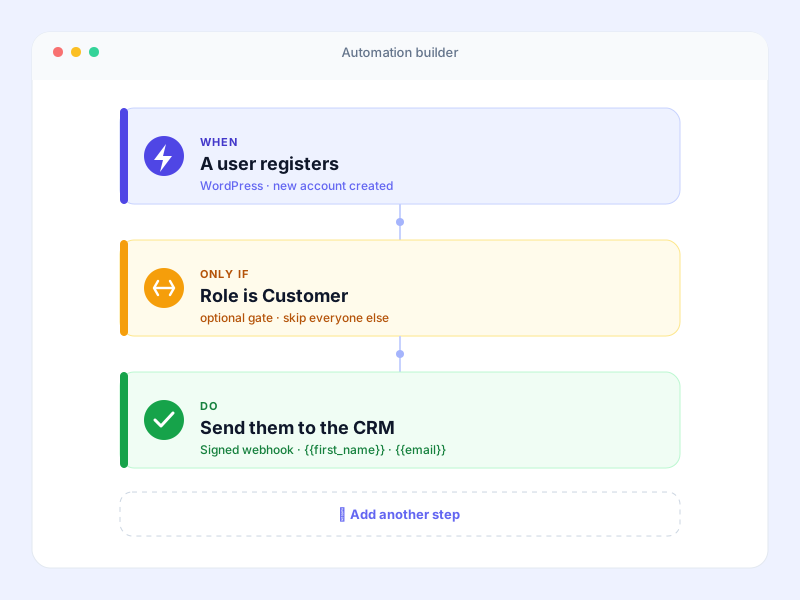
There's no canvas to learn and no diagram to draw. An automation is a sentence you can read back.
When this happens
An order is completed. A form is submitted. Somebody registers, finishes a course, or clicks a button you placed on a page. Add more than one trigger and choose whether all of them or any of them should count.
Only if it should
Optional, and often unnecessary. Gate the whole automation, or one step of it, on anything the trigger carried — the order total, the user's role, the form field, the date.
Do this
Send the email, grant the role, post to Slack, append the spreadsheet row, enrol them on the course. Steps run in order, and any one of them can wait minutes, hours or days first.
What's possible
The jobs people hand to Zapify first
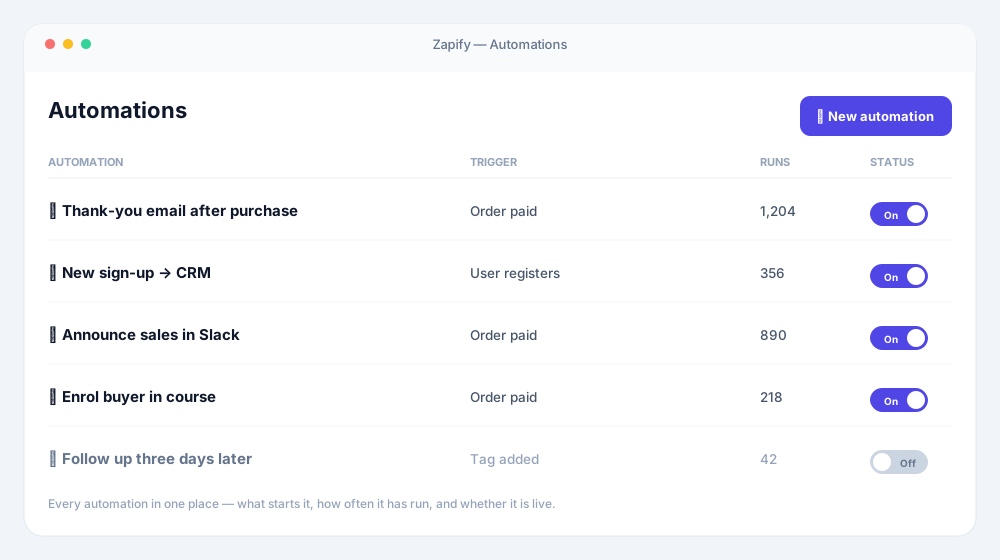
Each of these is a real automation you can build today — most of them start from a template.
Thank a customer the moment they buy
When an order is paid, email the customer. The obvious one — and the one most sites never quite get round to.
Enrol a buyer in their course
A product is purchased, so the customer is enrolled in the LearnDash course that comes with it. No manual step, no forgotten student.
Send new sign-ups straight to your CRM
Somebody registers and lands in FluentCRM or Mailchimp — tagged and ready for the sequence you already built.
Announce orders in Slack
The team sees sales as they happen instead of opening a dashboard to check.
Keep a spreadsheet of everything
Every order, or every form entry, appended to a Google Sheet so the numbers live somewhere you can sort them.
Follow up three days later
Add the tag now, send the email on Thursday. One automation, with the waiting built in.
Bridge the tools you already automate with
Start an automation from an inbound webhook, or call one out to n8n, Make or Zapier. Zapify is the WordPress half you were missing.
Draft copy with AI, then use it
Generate a summary or reply with OpenAI or Anthropic and hand it to the very next step.
Let people trigger a job with a click
Drop a button on any page with a shortcode and let a visitor start the automation themselves.
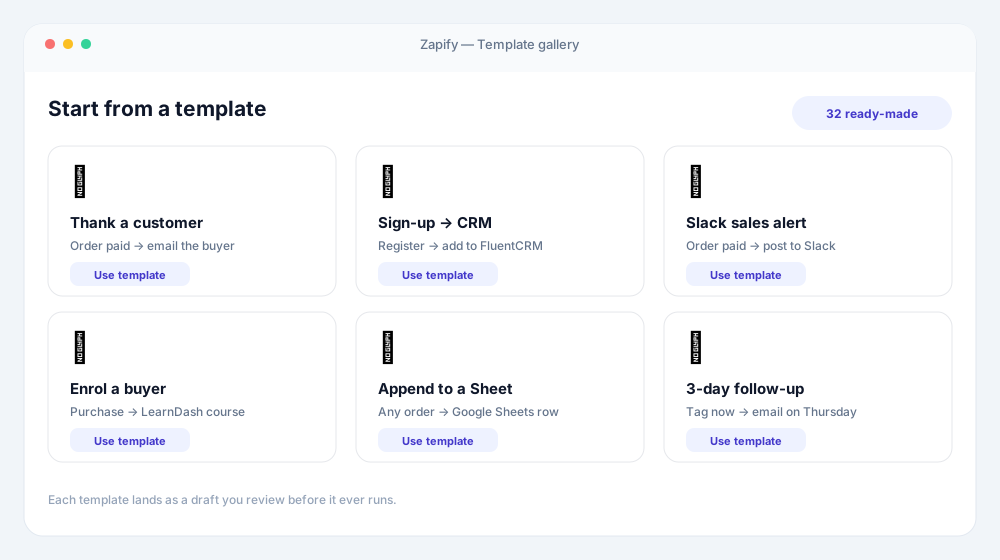
Built to do a lot, priced to do it freely
Real automation power in the free plugin — and no meter running while it works.
- Triggers
- 23
- Actions
- 18
- Ready-made templates
- 32
- Per-task fees
- $0
The run log
Never wonder "why did it do that?" again
Most automation tools tell you that something ran. Zapify shows you what it was actually given — every action's configuration recorded with your placeholders already filled in, written down before it executed.
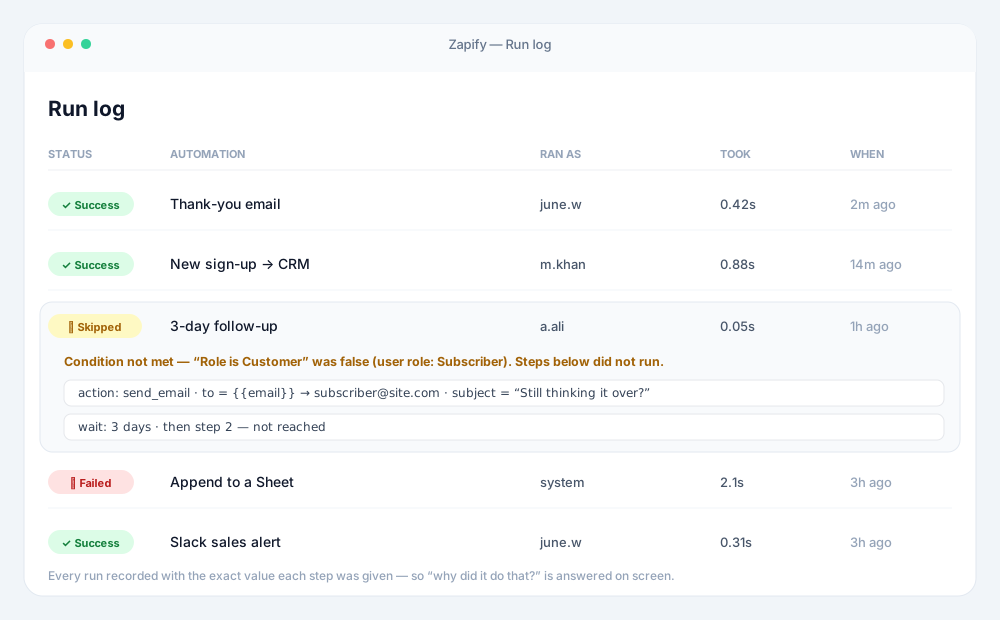
- →See the exact value each step received, not just a green tick.
- →Read the reason anything was skipped, in plain language.
- →Answer "why did it email the wrong person?" on screen, not in your imagination.
Integrations
Works with what you already have
Purpose-built integrations for the plugins you run — and, through the custom-hook and webhook triggers, anything else that speaks WordPress or HTTP.
 WordPress
 WooCommerce
 Gravity Forms
 Contact Form 7
 WPForms
 Fluent Forms
 Webhooks
 Utilities
 Slack
Pro
Slack
Pro
 Google Sheets
Pro
Google Sheets
Pro
 FluentCRM
Pro
FluentCRM
Pro
 Mailchimp
Pro
Mailchimp
Pro
 ActiveCampaign
Pro
ActiveCampaign
Pro
 ConvertKit
Pro
ConvertKit
Pro
 ClickUp
Pro
ClickUp
Pro
 AI — OpenAI & Anthropic
Pro
AI — OpenAI & Anthropic
Pro
 LearnDash
Pro
LearnDash
Pro
 LifterLMS
Pro
LifterLMS
Pro
 Tutor LMS
Pro
Tutor LMS
Pro
 Easy Digital Downloads
Pro
Easy Digital Downloads
Pro
 Ninja Forms
Pro
Ninja Forms
Pro
 Formidable Forms
Pro
Formidable Forms
Pro
 Buttons
Pro
Buttons
Pro
Don't see yours? The custom-hook trigger takes any WordPress action from any plugin, so if it fires a hook, Zapify can start from it.
Features
Everything you need, and nothing you have to learn first
Zapify is built so the common case takes a minute and the awkward case is still possible.
⚡ One sentence, not a flowchart
When this happens, do this. Pick a trigger, pick what follows, set it live. No canvas to learn, no boxes to connect, no vocabulary invented for the occasion.
🔗 The plugins you already run
WooCommerce, Contact Form 7, WPForms, Fluent Forms, Gravity Forms, LearnDash, FluentCRM, Slack, Google Sheets — and anything at all that speaks HTTP.
🎛 Filters where they belong
Gate the whole automation, or a single step, or the trigger itself. AND and OR combine with nested groups, and every group is named by what it means rather than by the word "group".
⏱ Delays that are honest
Add the tag, then email them three days later — one automation, not two. The queue runs about once a minute, and Zapify tells you that rather than pretending to be a stopwatch.
🔀 Branch instead of duplicating
Routes let one automation take different paths, and loops repeat a set of actions once for every item in a list. Both replace the folder of near-identical automations you would otherwise keep.
🪝 Webhooks in and out
Listen mode captures a real delivery and builds the token list from what actually arrived. Signatures are verified, replays outside a five-minute window are refused, and retries do not run anything twice.
🔍 A log that answers the question
Every run records what each action was configured with after the tokens were filled in — written before it executed. "The webhook sent 6054 and your rule compared it against the text 6055" is the answer, and it cannot be reconstructed afterwards.
🛡 It will not take your site down
A compiled hook map means a request matching no automation costs no extra queries. Recursion protection, a per-request repeat guard, and a circuit breaker that deactivates a runaway automation rather than letting it run away.
🔓 Nothing is held hostage
If a licence lapses, your automations are marked inactive and kept byte for byte. Nothing is deleted, nothing is rewritten, and everything runs again the moment it is restored.
Why not just use Zapier?
Use it, when the thing you're connecting lives outside WordPress. Zapify is for the other case — where both ends are already on your site, and sending the data on a round trip through somebody else's server to come straight back is a cost and a privacy question you never needed to have.
No per-task pricing. No data leaving your server. No automation that silently stops in the month you got busy.
Start with the free versionWhat is Zapify?
Zapify is a free, self-hosted WordPress automation plugin. You build a workflow as a simple sentence — when a trigger fires (an order, a form submission, a new user), Zapify runs the actions you choose (send an email, grant a role, call a webhook, add a CRM contact). Everything runs on your own server, with no per-task fees, and a run log shows exactly what happened at each step.
Pricing
Simple pricing: Free, or PRO for every feature
One PRO plan unlocks everything. Just choose how many sites you need — the price does the rest.
Free
A complete automation plugin, not a demo.
$0
1 site
- ✓Unlimited automations
- ✓Multiple triggers, ALL or ANY
- ✓Filter the trigger
- ✓Webhooks in and out
- ✓WooCommerce and the form plugins
- ✓Full run log
Everything, unlocked
PRO
Conditions, delays, routes, loops and every premium integration.
/ year
Use it on
- ✓Everything in Free
- ✓Conditions on automations & actions
- ✓Delays, routes & loops
- ✓Scheduled & bulk automations
- ✓Buttons
- ✓Slack, Google Sheets, FluentCRM, LearnDash, AI
- ✓Webhook auth, signing & retries
- ✓Import / export & extended log retention
- ✓Priority support
Every PRO licence includes updates and priority support, with a 30-day money-back guarantee. If a licence lapses, the free features keep working — nothing is deleted.
Love Zapify? Get it — and every plugin we make.
One emerald-tier membership unlocks all six PRO plugins — plus every plugin we release in the future, added automatically.
Buy the six separately
$344 / year
With Elite, from
$199 / year
Save $145 · 42% off
Explore Elite Membership →6 plugins today · every future plugin free · 30-day money-back
FAQ
Questions people ask before buying
- Zapify is a WordPress automation plugin. You pick a trigger — an order is completed, a form is submitted, a user registers — and pick what should follow, such as sending an email, granting a role, posting to Slack or adding a row to a spreadsheet. No code, and no external service in the middle.
- No. Zapify runs inside WordPress, so your data does not leave your server and there is no per-task billing. If you do want to reach an outside service, the webhook action posts anywhere and the webhook trigger receives from anything.
- WooCommerce, Contact Form 7, WPForms, Fluent Forms and Gravity Forms are supported in the free version, along with WordPress itself and webhooks. Zapify Pro adds Slack, Google Sheets, FluentCRM, LearnDash and AI. Anything not on the list can still be reached over a webhook, or through the custom hook trigger.
- Zapify compiles a map of the hooks your live automations actually need, so a request that matches nothing costs no extra queries. Work that does not have to happen during the page load is queued through Action Scheduler, the same queue WooCommerce uses.
- The run log records what each action was configured with after tokens were resolved, written before the action executed — so a failed run shows what it was actually about to do. There is also recursion protection, a per-request repeat guard, and a circuit breaker that deactivates a runaway automation rather than letting it take the site down.
- Yes. The free version is a complete automation plugin, not a demo: unlimited automations, multiple triggers, the full run log, webhooks in and out, and the form and WooCommerce integrations. Pro features are visible in the free build rather than hidden, so you can see exactly what you would be getting.
- They are marked inactive and kept exactly as they are, byte for byte. Nothing is deleted and nothing is rewritten, and everything runs again the moment the licence is restored.
- Yes. Export an automation to a JSON file and import it elsewhere. Site-specific identifiers are stripped on the way out, because they mean nothing on the site it is going to, and webhook keys are dropped because an export is a file people email each other.
- Zapify runs per site. Each site in a network keeps its own automations, logs and settings.
- WordPress 6.4 or later and PHP 7.4 or later. If you are running WooCommerce you already meet both.
What is Zapify? +
Do I need a Zapier or Make subscription? +
Which plugins does it work with? +
Will it slow my site down? +
What happens if an automation goes wrong? +
Can I try it before buying? +
What happens to my automations if I stop paying? +
Can I move automations between sites? +
Does it work with multisite? +
What are the requirements? +
