Find and replace anything on your site — without breaking it.
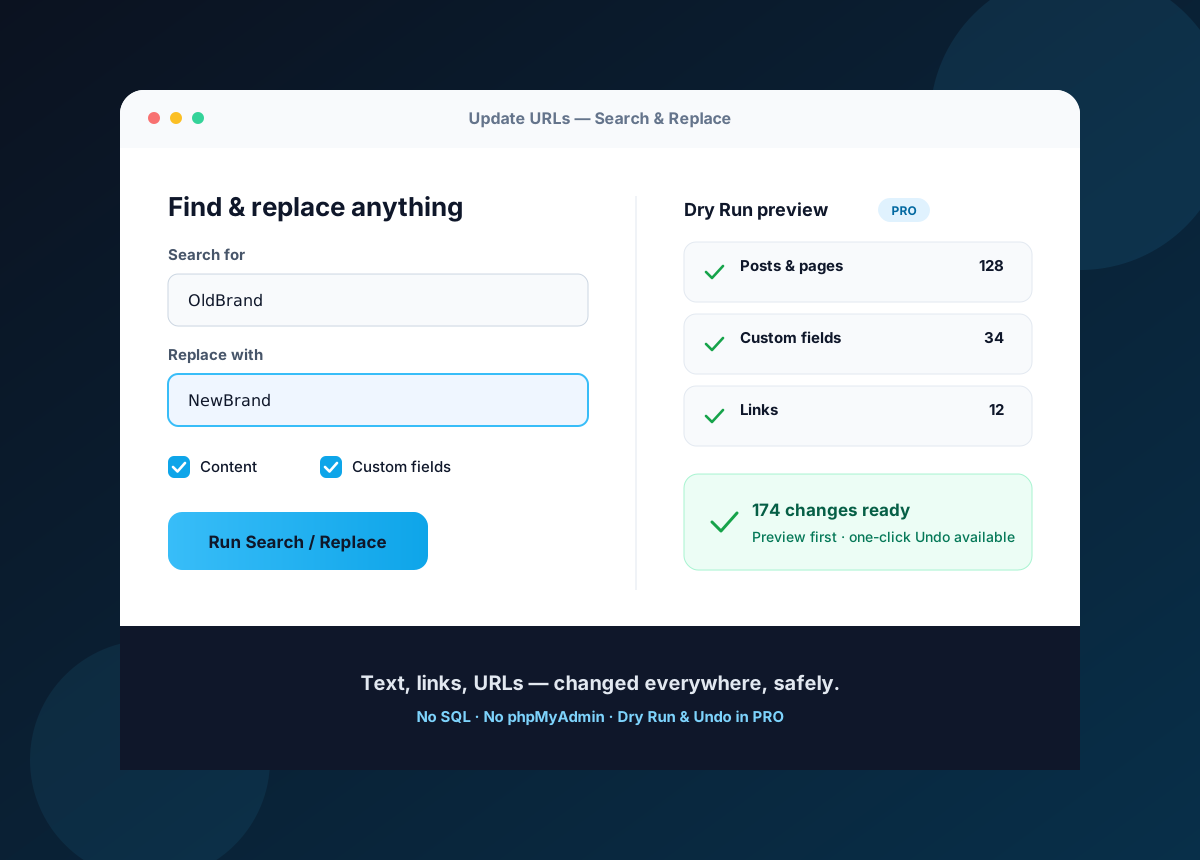
Update URLs is a WordPress search-and-replace plugin: change any text, link, URL or path across your content and database in one pass — perfect for migrations, rebrands, and bulk content edits. Preview every change with a Dry Run and undo it in one click (PRO), with no phpMyAdmin and no SQL.
Dry Run preview & one-click Undo (PRO) • No SQL or phpMyAdmin • 30-day money-back guarantee
The problem
When something has to change in hundreds of places.
An old domain, a renamed brand, a phone number, a link, a phrase repeated across every post — WordPress stores it inside content, custom fields, and data other plugins saved. Changing it by hand is slow; a raw SQL replace is dangerous.
The same edit, everywhere
A brand name, phrase, link or number repeated across hundreds of posts, pages and custom fields.
Broken images & links
After a move, media and internal links still point at the old domain or path.
Mixed-content & 404s
Old http:// references and dead links break pages and worry search engines.
Risky manual SQL
A raw find-and-replace in phpMyAdmin can corrupt serialized data and take the whole site down.
The solution
What is Update URLs?
Update URLs is a free WordPress search-and-replace plugin. Find and replace any text, link, URL or path across your posts, pages, custom fields (including serialized data), attachments, links and GUIDs — in one pass, from your WordPress admin. It's perfect for migrations and domain changes, and just as useful for rebrands, bulk content edits, and fixing anything repeated site-wide. PRO adds a Dry Run preview, one-click Undo, and a one-click database backup, so you can change everything safely without touching phpMyAdmin.
How it works
Find it, preview it, replace it — undo it if you need to
A migration-safe workflow, right inside WordPress.
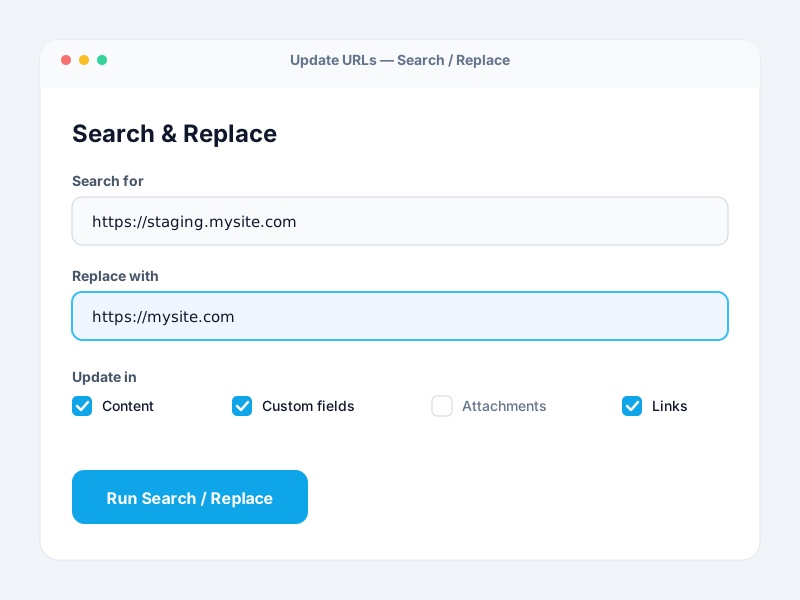
Enter old & new
Type the old URL or text and the new one, then choose the scope — content, custom fields, attachments, links.
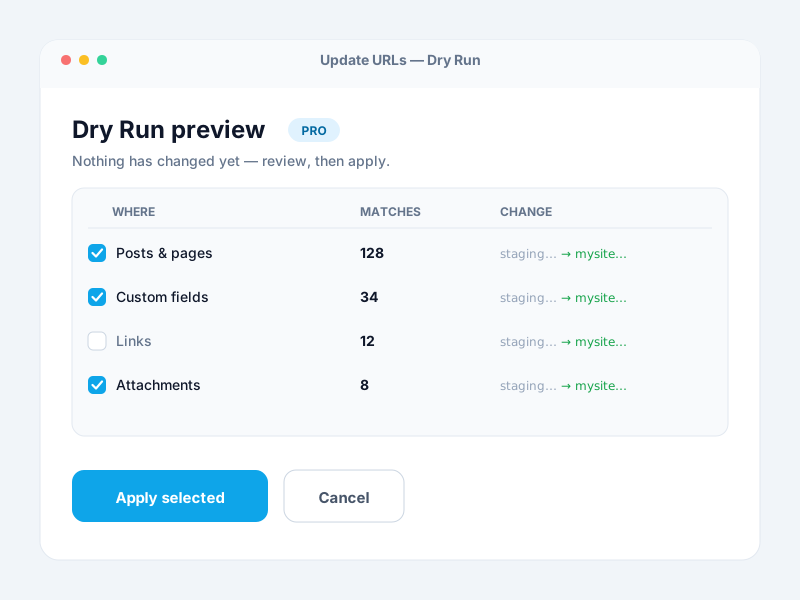
Preview with a Dry Run PRO
See exactly what will change before anything is written, then apply all of it or just the results you choose.
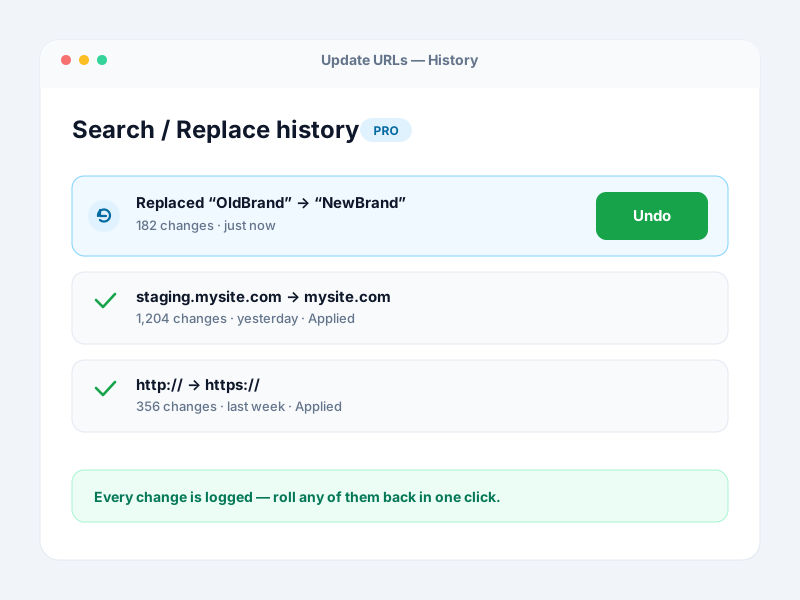
Undo if you need to PRO
Every operation is logged, and a one-click Undo rolls it back — with a one-click database backup as your safety net.
Why it matters
What you get out of it
Change everything in one pass
Replace any text, link or URL across thousands of posts, pages and fields at once — no manual editing.
No broken images or links
Fix every old path and reference so pages render correctly and search engines keep their links.
Change with confidence
Preview with a Dry Run and undo in one click (PRO), backed by a one-click database backup.
No SQL, no phpMyAdmin
Everything runs from your WordPress admin — no database tools, no risky queries.
Features
Everything you need to search & replace safely
A safety net for every change
- ✓ Dry Run preview before applying Pro
- ✓ One-click Undo (rollback) Pro
- ✓ One-click database backup & restore Pro
- ✓ Complete search/replace history Pro
Precise, targeted control
- ✓ Scope: content, excerpts, custom fields
- ✓ Attachments, links & GUIDs
- ✓ Serialized custom-field data handled
- ✓ Select specific database tables Pro
- ✓ Apply all or only chosen results Pro
Built for repeat work & big sites
- ✓ Save & load custom profiles Pro
- ✓ Per-section update counts
- ✓ Large-site support Pro
- ✓ Case-sensitive matching
- ✓ Priority email support Pro
Use cases
Made for the moments something has to change everywhere
Bulk content edits
Replace a brand name, product name, phrase, phone number or address across every post, page and field at once.
Staging → live
Push a staging build live and replace the staging domain with the production one across the whole site.
Domain change / rebrand
Move to a new domain and update every internal link and reference so nothing points at the old brand.
HTTP → HTTPS
After installing SSL, swap http:// for https:// everywhere to clear mixed-content warnings.
Agencies & handoffs
Migrate and edit client sites confidently — Dry Run and Undo (PRO) mean a mistake is never permanent.
Coming from Velvet Blues / Better Search Replace
Update URLs is a maintained fork of Velvet Blues — switch over and get a Dry Run, Undo and backup on top.
Powerful for big changes, careful with your data
- Preview every change (PRO)
- Dry Run
- Undo & DB backup (PRO)
- 1-click
- Lines of SQL you write
- 0
- Money-back guarantee
- 30-day
Loved by WordPress site owners
What KaizenCoders customers say
Real reviews from people who use our plugins. Update URLs is open-source and free on WordPress.org — try it before you ever pay.
“The free version has everything I was looking for!”
 Djlaszlo
★★★★★
Verified review
Djlaszlo
★★★★★
Verified review
“Exactly what I was looking for.”
 Dimgord
★★★★★
Verified review
Dimgord
★★★★★
Verified review
“As I said in the title, it works great. Nothing else to add 🙂”
 Allisfullofvuoto
★★★★★
Verified review
Allisfullofvuoto
★★★★★
Verified review
Why Update URLs
A safer way to search and replace
vs. raw SQL in phpMyAdmin
A blind SQL find-and-replace corrupts serialized data and has no undo. Update URLs handles serialized fields and gives you a Dry Run and rollback (PRO).
vs. editing by hand
Stop opening pages one by one and re-uploading media. One pass updates every reference across your site.
vs. an unmaintained plugin
As a maintained fork of Velvet Blues Update URLs — tested with the latest WordPress — it keeps working, with PRO safety tools on top.
Free vs PRO
Free does the replacing. PRO does it safely.
The free plugin replaces URLs across your content. PRO adds the preview, the undo, and the backup that make big changes low-risk.
| Capability | Free | PRO |
|---|---|---|
| Replace URLs & text in content, excerpts, custom fields | ✓ | ✓ |
| Attachments, links & GUID replacement | ✓ | ✓ |
| Serialized custom-field data handled | ✓ | ✓ |
| Per-section update counts | ✓ | ✓ |
| Case-sensitive matching | ✓ | ✓ |
| Dry Run — preview changes before applying | — | ✓ |
| Apply all, or only selected results | — | ✓ |
| One-click Undo (rollback) | — | ✓ |
| One-click database backup & restore | — | ✓ |
| Select specific database tables | — | ✓ |
| Complete history & saved profiles | — | ✓ |
| Large-site support & priority support | — | ✓ |
Pricing
Simple pricing: Free, or PRO for every feature
One PRO plan unlocks everything. Just choose how many sites you need — the price does the rest.
Free
Bulk search-and-replace for your WordPress content — free forever.
$0
1 site
- ✓Replace URLs & text everywhere
- ✓Content, excerpts & custom fields (serialized)
- ✓Attachments, links & GUIDs
- ✓Per-section update counts
- ✓No SQL or phpMyAdmin
Everything, unlocked
PRO
Dry Run, one-click Undo, database backup and more.
/ year
Use it on
- ✓Everything in Free
- ✓Dry Run — preview before you apply
- ✓One-click Undo (rollback)
- ✓One-click database backup & restore
- ✓Select specific tables & scope
- ✓History & saved profiles
- ✓Large-site support
- ✓Priority support
Every PRO licence includes updates and priority support, with a 30-day money-back guarantee. If a licence lapses, the free features keep working — nothing is deleted.
Love Update URLs? Get it — and every plugin we make.
One emerald-tier membership unlocks all six PRO plugins — plus every plugin we release in the future, added automatically.
Buy the six separately
$344 / year
With Elite, from
$199 / year
Save $145 · 42% off
Explore Elite Membership →6 plugins today · every future plugin free · 30-day money-back
Free forever base
The free plugin fully replaces URLs across your content — no trial timer.
Backup + Undo (PRO)
A one-click database backup and one-click rollback mean a mistake is never permanent.
30-day money-back
Not the right fit? Get a full refund within 30 days.
Updates & support
Every paid plan includes updates and priority support.
FAQ
Questions people ask before running it
- Always take a full backup first. In PRO you also get a built-in one-click database backup, a Dry Run to preview every change before applying it, and one-click Undo to roll a replacement back. In the free version changes are applied immediately and are not easily reversible, so back up before you run it.
- Update URLs replaces values inside post meta and custom fields, including serialized data, so arrays and settings stored by other plugins stay intact rather than being corrupted by a raw SQL replace.
- Yes, with PRO. The Dry Run shows exactly what will be updated, and you can then apply all of the results or only the specific ones you choose. The free version applies changes immediately without a preview.
- Yes, in PRO — one-click Undo rolls back a search/replace operation, and the one-click database backup lets you restore the whole database. The free version has no undo, so a backup beforehand is essential.
- No. Everything runs from your WordPress admin. You enter the old value and the new value, choose where to update, and run it — no database tools or SQL required.
- Yes. That is exactly what it is built for. Replace an old domain with a new one, or http:// with https://, across your posts, pages, custom fields, attachments and links in a single pass.
- Content (posts, pages, custom post types, revisions), excerpts, custom fields, attachments, the links table and GUIDs. PRO adds a table picker so you can target exactly which database tables are changed.
- Yes. Update URLs is an actively maintained fork of Velvet Blues Update URLs, tested with the latest WordPress. Install it and carry on — and upgrade to PRO for the Dry Run, Undo and backup those tools do not give you for free.
- Yes. Licences cover 1, 3 or 25 sites, and every paid plan includes the full PRO feature set — you only pay for the number of sites.
- Nothing is deleted. The free features keep working; the PRO tools simply pause until you renew. Every paid plan also comes with a 30-day money-back guarantee.
Is it safe to run a search-and-replace on my live site? +
Will it break my serialized data or custom fields? +
Can I preview changes before they are applied? +
Can I undo a replacement if something goes wrong? +
Do I need to touch phpMyAdmin or write SQL? +
Does it handle a domain migration or HTTP to HTTPS move? +
Which content and tables does it update? +
I use Velvet Blues Update URLs or Better Search Replace — can I switch? +
Can I use it on multiple sites? +
What happens if my licence lapses? +
Your next big change doesn't have to be scary.
Start free on WordPress.org, and upgrade to PRO for the Dry Run, one-click Undo, and database backup that make big changes safe.
How Update URLs compares
See how it stacks up against popular alternatives.
