 Dynamic QR codes for WordPress
Print it once.
Change where it goes any time.
QRify creates QR codes that point to a short link on your own domain — like yoursite.com/qr/menu. Re-point it, pause it or let it expire after it's printed, and see how many people scanned it. All from WordPress, with no QR subscription.
- 11
- content types
- 5,000
- rows per CSV import
- 0
- IP addresses stored
The problem
The menu changed. The 500 printed table cards didn't.
A normal QR code has its destination baked in. Once it's on paper, a wrong link, a moved page or an ended campaign means reprinting — or living with a code that goes nowhere.
✕ A code from a free generator
- The link is fixed forever. A typo on the flyer is a typo on every flyer.
- You have no idea whether anyone scanned the poster at all.
- When the promotion ends, the code keeps sending people to a dead page.
- "Dynamic" QR services fix this — for a monthly fee, on their domain. Stop paying and the redirect can stop too.
- Every code looks the same: black squares, no logo, nothing that says it's yours.
✓ A dynamic code from QRify
- The code holds a short link on your site. Change the destination and every printed copy follows.
- Scans, unique visitors, devices and browsers, charted over time.
- Pause it, give it an expiry date, or cap it at a number of scans.
- It runs on your WordPress. If your licence lapses, printed codes keep redirecting.
- Your colours, your logo in the centre, and a "Scan me" frame.
How it works
From idea to printed code in three steps
Pick what it does
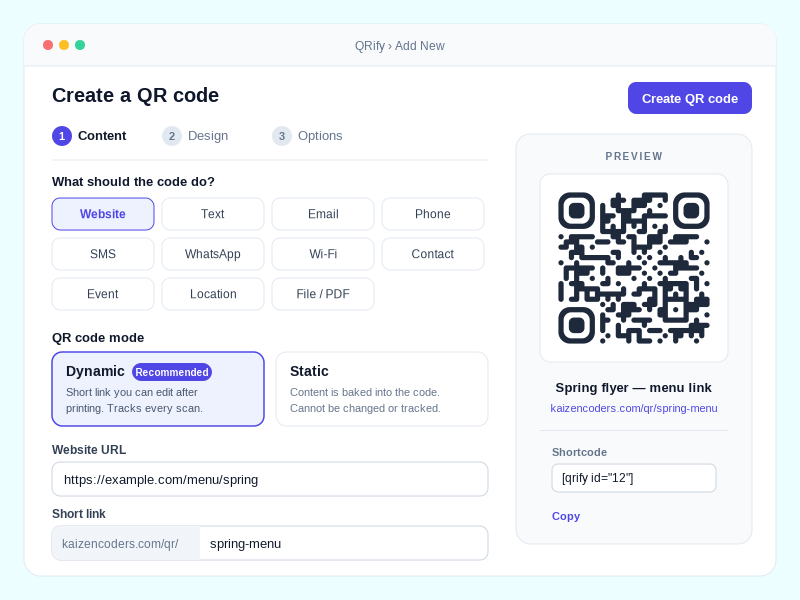
Open a website, save a contact card, add an event to a calendar, join a Wi-Fi network, start a WhatsApp chat or download a PDF. Choose Dynamic to get a short link you can edit later.
Make it yours
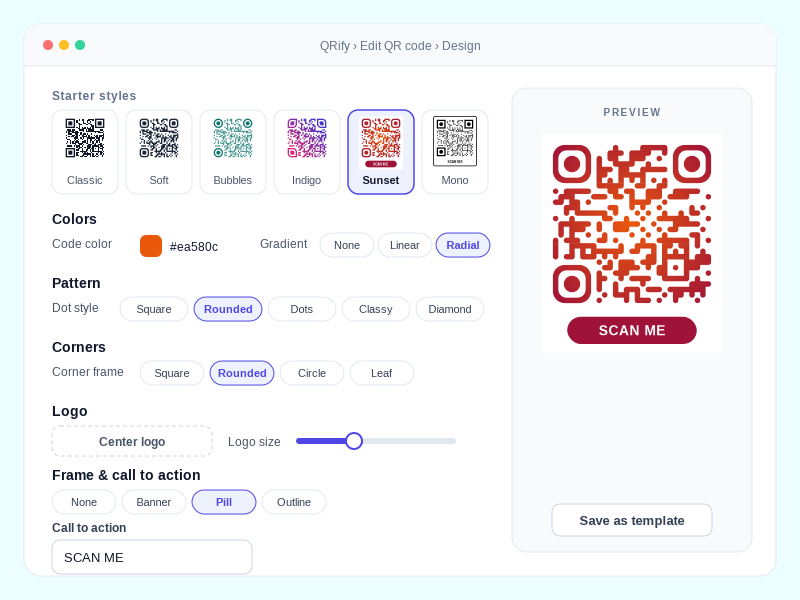
Colours and gradients, rounded dots, styled corners, your logo in the middle and a call-to-action frame. Start from a preset or a template you saved earlier.
Print, then track
Download a vector SVG, a print-ready PDF or a high-res PNG at the exact size you're printing. Then watch the scans arrive — and change the destination whenever you need to.
Dynamic or static
Two kinds of code. You choose per code.
Dynamic is the default because it's the one you can fix later. Static is for when the code has to work with no internet connection at all.
| Dynamic Recommended | Static | |
|---|---|---|
| What's inside the code | A short link on your domain | The content itself |
| Change it after printing | ✓ | — |
| Scan analytics | ✓ | — |
| Pause, expiry date, scan limit | ✓ | — |
| Works without your site | — (it redirects through your site) | ✓ |
| Wi-Fi login | — | ✓ (phones join offline) |
Who it's for
Anyone who puts a WordPress link on paper
Restaurants and cafés
One code per table, made in a single CSV import. Update the menu page and every table card is current — no reprint.
Print and outdoor campaigns
A flyer code that expires when the offer does, and a scan count that tells you which poster actually worked.
Business cards and staff
A contact-card code that saves your name, phone, email and website straight to the phone. Import a whole team from a spreadsheet.
Events
A calendar code that adds the event to the attendee's phone, and a page code that follows the agenda as it changes.
Shops and product pages
Turn on automatic codes for products, posts or pages, and every one gets a code linking back to itself.
Hotels, offices and rentals
A Wi-Fi code on the wall so guests join the network without spelling out the password.
The designer
A code that looks like it belongs to you
People are more willing to scan a code that clearly comes from your brand. Style it with a live preview, and save the look so the next hundred codes match.
- →Code and background colours, with linear or radial gradients, or a transparent background.
- →Five dot styles — square, rounded, dots, classy and diamond — and separately styled corners.
- →Your logo in the centre, with clear space behind it.
- →A banner, pill or outline frame with your own call to action ("SCAN ME" by default).
- →Six one-click presets, and design templates you can set as the default for every new code.
Print-ready downloads
The right file for the print shop, first time
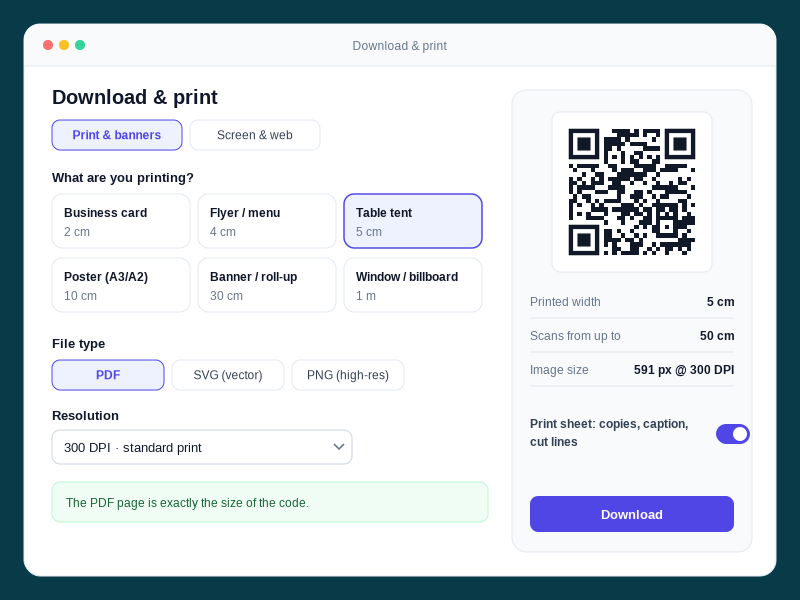
A code that's too small for where it hangs is a code nobody can scan. Tell QRify what you're printing — business card, flyer, table tent, poster, banner or window — and it gives you the file at that exact physical size.
- →SVG — vector, sharp at any size, for print shops and design apps.
- →PDF — the page is exactly the size of the code, so it drops into a layout.
- →PNG at 150, 300 or 600 DPI, with the DPI embedded so it opens at the right size.
- →A warning when the code is too small for its use, and the distance it will scan from.
- →Print sheets with multiple copies, a caption and cut lines.
Scan analytics
Find out which poster actually got scanned
Every dynamic code counts its scans. See totals and unique visitors over 7 days, 30 days, 90 days or 12 months, broken down by device, operating system, browser and country — for one code or all of them.
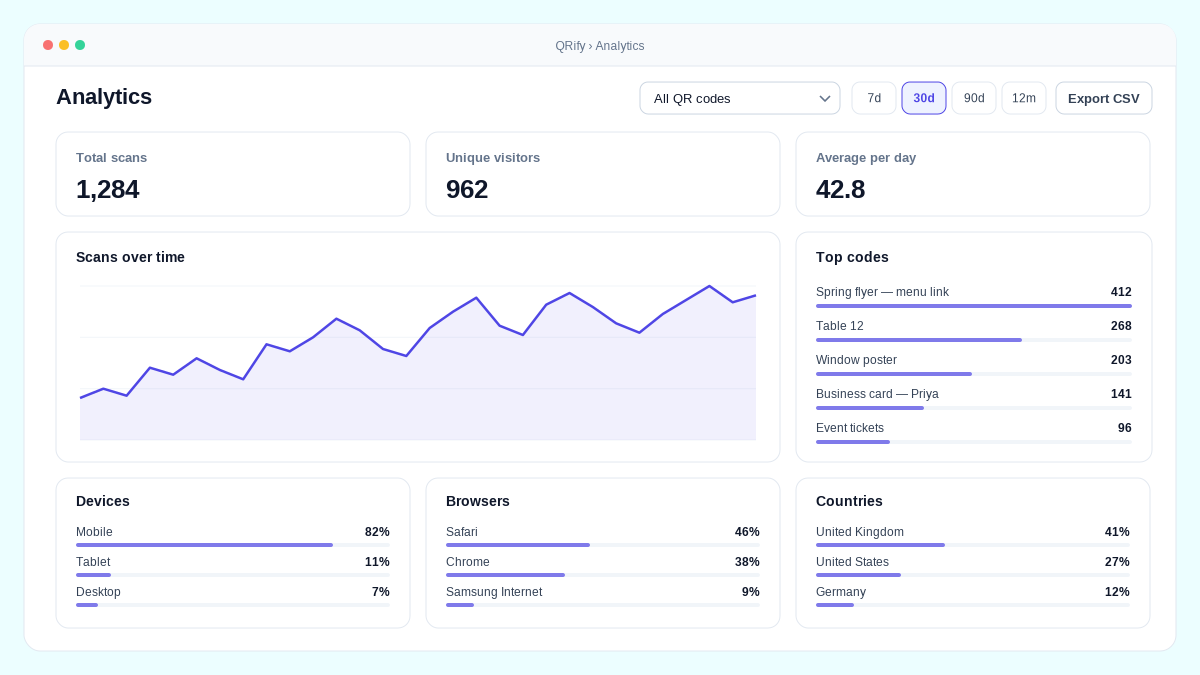
- →Honest counts. Crawlers and link previews (Slack, WhatsApp, Telegram and others) are filtered out, and you can ignore your own test scans.
- →No IP addresses stored. Visitors are counted with a salted hash that changes every day.
- →You set the retention. Keep scan details for as many days as you choose; totals are always kept.
Country comes from your CDN (for example Cloudflare or CloudFront) when your site sits behind one. QRify doesn't do its own GeoIP lookup or call a third-party service.
Bulk import
Hundreds of codes from one spreadsheet
Table numbers, product links, staff contact cards, event tickets. Upload a CSV or paste straight from Excel, Google Sheets or Numbers, match your columns, and see every row checked before anything is created. One bad row never sinks the batch.
When it's done, download every code in one ZIP, each file named after its code — ready for the printer or a mail merge.
On your site
Show codes on your pages, too
- Shortcode —
[qrify id="12"]for a code you made, or[qrify url="current"]for the page it's on. - QR Code block — the same, in the block editor.
- Automatic codes — add a code to every post, page or product, before or after the content. Authors can hide it on any single post.
- No front-end weight — codes are rendered once on the server as inline SVG and cached. QRify adds no JavaScript or CSS to your pages.
Everything included
One plugin, no feature tiers
Every licence gets all of it. There is no "basic" plan with the useful parts missing.
Codes you can change later
- Re-point a dynamic code to a new destination at any time
- Pause a code, or give it an expiry date or a scan limit
- Short links on your domain — /qr/menu — with a prefix you choose
- Change the prefix safely: every code keeps the link it was printed with
- A short link locks once scanned, so printed copies never break
11 things a code can do
- Website, text, email, phone and SMS
- WhatsApp chat with a pre-filled message
- Wi-Fi login (static, so phones join offline)
- Contact card (vCard) and calendar event
- Map location and file / PDF download
Designed and printed properly
- Colours, gradients, five dot styles and styled corners
- Centre logo and "Scan me" frames
- Saved design templates, applied to many codes at once
- SVG, print-ready PDF and PNG at 150–600 DPI
- Print sheets with copies, captions and cut lines
Built for WordPress
- [qrify] shortcode and a QR Code block
- Automatic codes on posts, pages or products
- Bulk import from CSV or pasted spreadsheet data
- Inline SVG, cached — no front-end JavaScript or CSS
- Developer hooks: qrify_scanned, qrify_scan_target and more
Why not a hosted QR code service?
Use one if you don't run WordPress, or you need a team workspace outside your site. QRify is for the other case: your website already exists, so the short link can live on your domain instead of someone else's — and the redirect doesn't depend on a subscription you have to keep paying.
The honest trade-off: a dynamic code redirects through your WordPress site, so it works as long as your site does. If that's a problem for one code, make that code static.
See pricingWhat is QRify?
QRify is a premium WordPress plugin for creating static and dynamic QR codes. A dynamic QRify code encodes a short link on your own domain, so you can change its destination, pause it, set an expiry date or a scan limit after it has been printed, and see scan analytics. It supports 11 content types — including websites, contact cards, calendar events, Wi-Fi and files — with a visual designer, CSV bulk import, print-ready SVG, PDF and PNG downloads, a shortcode, a block and automatic codes on posts.
New to it? Start with the QRify getting started guide.
Pricing
One plan, every feature
QRify is a premium plugin with no feature tiers. Choose how many sites you need and whether to pay yearly or once.
Everything, unlocked
PRO
Dynamic and static codes, the designer, bulk import, analytics and print-ready exports.
/ year
Use it on
- ✓Unlimited dynamic & static QR codes
- ✓11 content types, incl. vCard, event, Wi-Fi & file
- ✓Change, pause, expire or scan-limit codes after printing
- ✓Designer with logo, frames & saved templates
- ✓Bulk import from CSV (up to 5,000 rows) + ZIP download
- ✓Scan analytics with CSV export
- ✓SVG, PDF & DPI-tagged PNG, print sheets
- ✓Shortcode, block & automatic codes on posts
- ✓Updates & priority support
Every licence includes updates and priority support, with a 30-day money-back guarantee. If a licence lapses, the QRify admin is locked — but printed codes, shortcodes and blocks keep working, and nothing is deleted.
Love QRify? Get it — and every plugin we make.
One emerald-tier membership unlocks all seven PRO plugins — plus every plugin we release in the future, added automatically.
Buy the seven separately
$393 / year
With Elite, from
$199 / year
Save $194 · 49% off
Explore Elite Membership →7 plugins today · every future plugin free · 30-day money-back
FAQ
Questions people ask before buying
- A dynamic QR code holds a short link — on QRify, a link on your own domain such as yoursite.com/qr/menu — instead of the final destination. When someone scans it, your site sends them on to wherever the code currently points. That is what lets you change the destination after printing and count the scans.
- Yes, for dynamic codes. Edit the code in QRify and every printed copy goes to the new destination on the next scan. The short link itself locks after the first scan, so the printed code can never be broken by accident. Static codes have their content baked in and cannot be changed.
- No. QRify is a premium plugin and every licence includes every feature. There is a 30-day money-back guarantee if it does not work out for you.
- They keep working. The licence unlocks the QRify admin screens; the redirects, the [qrify] shortcode and the QR Code block are never licence-gated, because a printed code should not stop working when a renewal is missed. Nothing is deleted.
- Yes. A dynamic code redirects through your WordPress site, so it works for as long as your site is online and QRify is active. Static codes do not depend on your site at all. If you uninstall QRify with "Delete all data when uninstalling" switched on, dynamic codes stop working — that setting is off by default.
- No. Visitors are counted with a salted hash that changes every day and cannot be turned back into an IP address. You can also switch off detailed scan recording so only the total count is kept, and choose how many days scan details are kept.
- No. Crawlers, monitoring tools and link-preview fetchers from apps like Slack, WhatsApp and Telegram are filtered out. You can also ignore scans by logged-in QRify managers while you test.
- SVG (vector), a print-ready PDF sized exactly to the code, and PNG with the DPI embedded at 150, 300 or 600 DPI. For screens and the web there are PNG, SVG and JPG. You can also print sheets of copies with captions and cut lines, and download many codes at once as a ZIP.
- Maybe not. URL Shortify PRO can download a plain PNG or SVG QR code for any short link, and scans count as clicks. That covers a simple code for a link. QRify is for when you need more: contact-card, event, Wi-Fi and other content types, a designer with your logo and frames, print sizing and PDFs, bulk import from a spreadsheet, and pause, expiry and scan limits per code.
- QRify renders each code once on the server as inline SVG and caches it, and adds no JavaScript or CSS to your front end. A scan is handled early in the request, before WordPress builds the page.
- Yes. Network-activating QRify sets it up on every site in the network, and each site keeps its own codes, scans and settings.
- WordPress 6.2 or later and PHP 7.4 or later. Pretty permalinks give you short links like /qr/menu; with plain permalinks, links use ?qrify= instead.
What is a dynamic QR code? +
Can I change where a QR code goes after it is printed? +
Is there a free version? +
What happens to my printed QR codes if my licence expires? +
Do dynamic codes depend on my website? +
Does QRify store visitors' IP addresses? +
Are bot and link-preview visits counted as scans? +
Which file formats can I download? +
I already use URL Shortify PRO. Do I need QRify? +
Will it slow my site down? +
Does it work with multisite? +
What are the requirements? +
Stop reprinting. Start knowing who scanned.
Make your first dynamic QR code in a minute, and keep the right to change your mind after it's printed.
Get QRify